
Railpack and Dockerfiles
Ployz builds your app with Railpack, so you don't need a Dockerfile. Railpack reads your repository, works out the language and framework, and builds an image that installs, builds and starts your app. If you'd rather use your own Dockerfile, you can.
Build without a Dockerfile
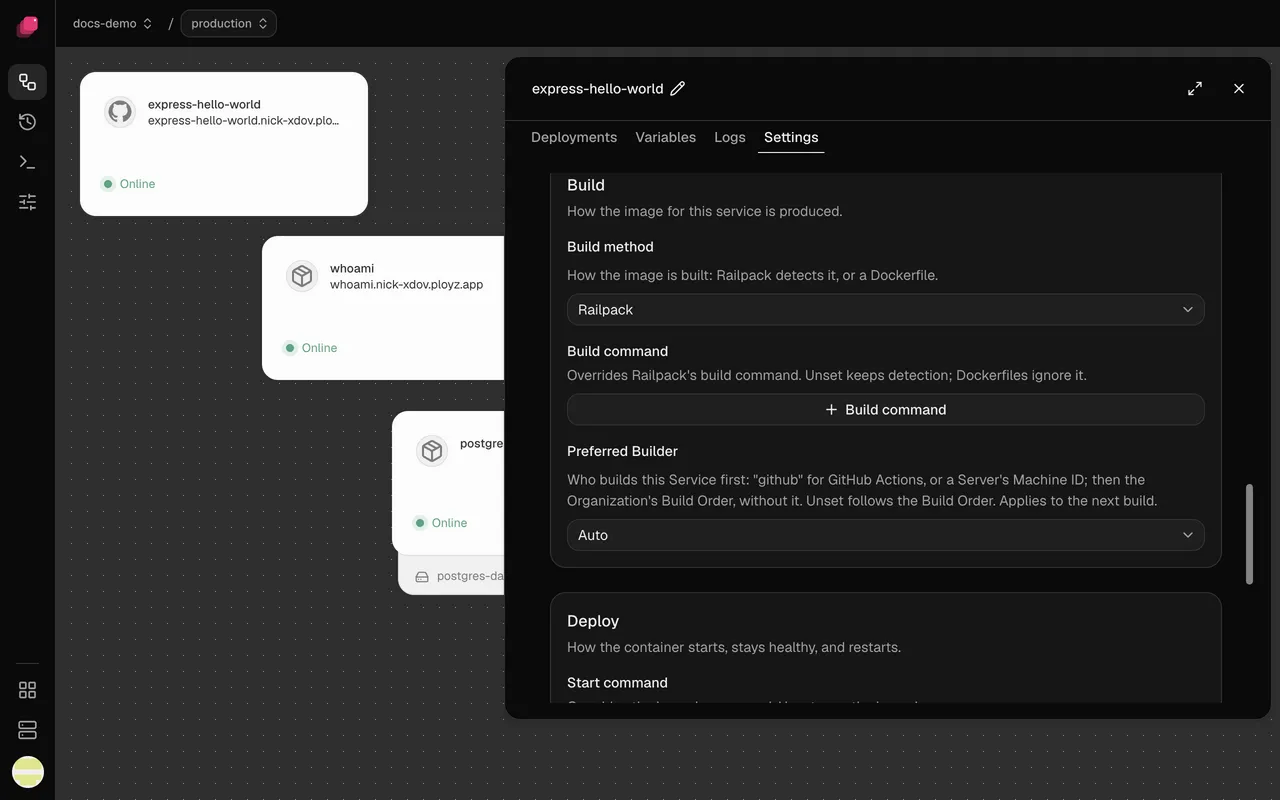
Section titled “Build without a Dockerfile”Every service you add from GitHub starts on Railpack, even when the repository has a Dockerfile. Railpack detects Node, Python, Ruby, PHP, Go, Rust, Java, Elixir and more; its docs list the files it looks for. Build settings are under the service's Settings → Build, and changes to them are staged until you deploy, except Preferred Builder, which applies at once.
Change the build and start commands
Section titled “Change the build and start commands”When Railpack picks the wrong build step:
- Open the service and go to Settings → Build.
- Click Build command and enter the command, like
pnpm run build. - Deploy.
Railpack still works out the rest, like installing dependencies. To change how your app
starts, set Start command under Settings → Deploy, like node server.js. It runs in a
shell, so $PORT works.
For anything else, like extra system packages, add a railpack.json to the root directory or
set Railpack's own RAILPACK_* variables on the service.
Build with a Dockerfile
Section titled “Build with a Dockerfile”Use your Dockerfile when you already have one that works, or when your app needs more than Railpack can work out.
The build starts in the service's root directory: COPY . . copies that folder, and
Dockerfile path is relative to it. To build one app of a monorepo, set its root directory
first; see Deploy a monorepo.
- Open the service and go to Settings → Build.
- Set Build method to Dockerfile.
- If your Dockerfile isn't
Dockerfilein the root directory, enter its path in Dockerfile path. - Deploy.
Dockerfile path suggests paths from the top of the repository, so with a root directory set, shorten them to start from it.
Use variables at build time
Section titled “Use variables at build time”Every variable of the service reaches its build, secrets included, with references to other services filled in. Changing one rebuilds the service.
-
Railpack gives them to every build step and keeps their values out of the image's metadata.
-
A Dockerfile gets them as build arguments. Declare each one a step needs with
ARG:ARG NEXT_PUBLIC_API_URL RUN npm run build
Builds on GitHub Actions get your variables too.
Install private packages
Section titled “Install private packages”Builds have no SSH keys or registry logins of their own. Give the build a token through a
secret variable instead. For a private npm package, add a variable NPM_TOKEN and an .npmrc
next to your package.json:
//registry.npmjs.org/:_authToken=${NPM_TOKEN}Railpack builds see NPM_TOKEN as it is. A Dockerfile needs ARG NPM_TOKEN before the
install step, so give it a short-lived token. Private Git dependencies work the same way, over
HTTPS with a token in the URL.
A token can't get a Dockerfile FROM a private image: use a public base image.
When your servers mix x86 and ARM
Section titled “When your servers mix x86 and ARM”- With Railpack, there's nothing to do: Ployz builds the service for both.
- With a Dockerfile, the image only runs on the kind of CPU of the server that built it. A deploy that would start it on the other kind fails before it changes anything.
To deploy a Dockerfile service, switch it to Railpack, or run it on one kind of server:
-
Turn off services on the servers of the other kind. This is CLI-only for now, and applies to every service on those servers:
ployz server set arm-1 --accepts-services=false -
Build on the kind that's left: make a server of that kind the service's Preferred Builder, or build on GitHub Actions.
Good to know
Section titled “Good to know”- Keep files out of the build with a
.dockerignorein the root directory. It works with Railpack and with Dockerfiles.