
Scaling and multiple servers
When one copy of your app isn't enough, run more. Each copy is a replica, and Ployz spreads replicas over your servers. Think of your servers as one pool: a visitor can land on any of them, and that server hands the request to a healthy replica wherever it runs.
flowchart LR
  visitor(["Visitors"]) --> s1["Server 1"] & s2["Server 2"]
  s1 & s2 -.-> r1["web, on server 1"] & r2["web, on server 2"] & r3["web, on server 3"]
Run more replicas
Section titled “Run more replicas”- Open your service and go to Settings → Scale.
- Set Replicas, up to 50.
- Click Deploy.
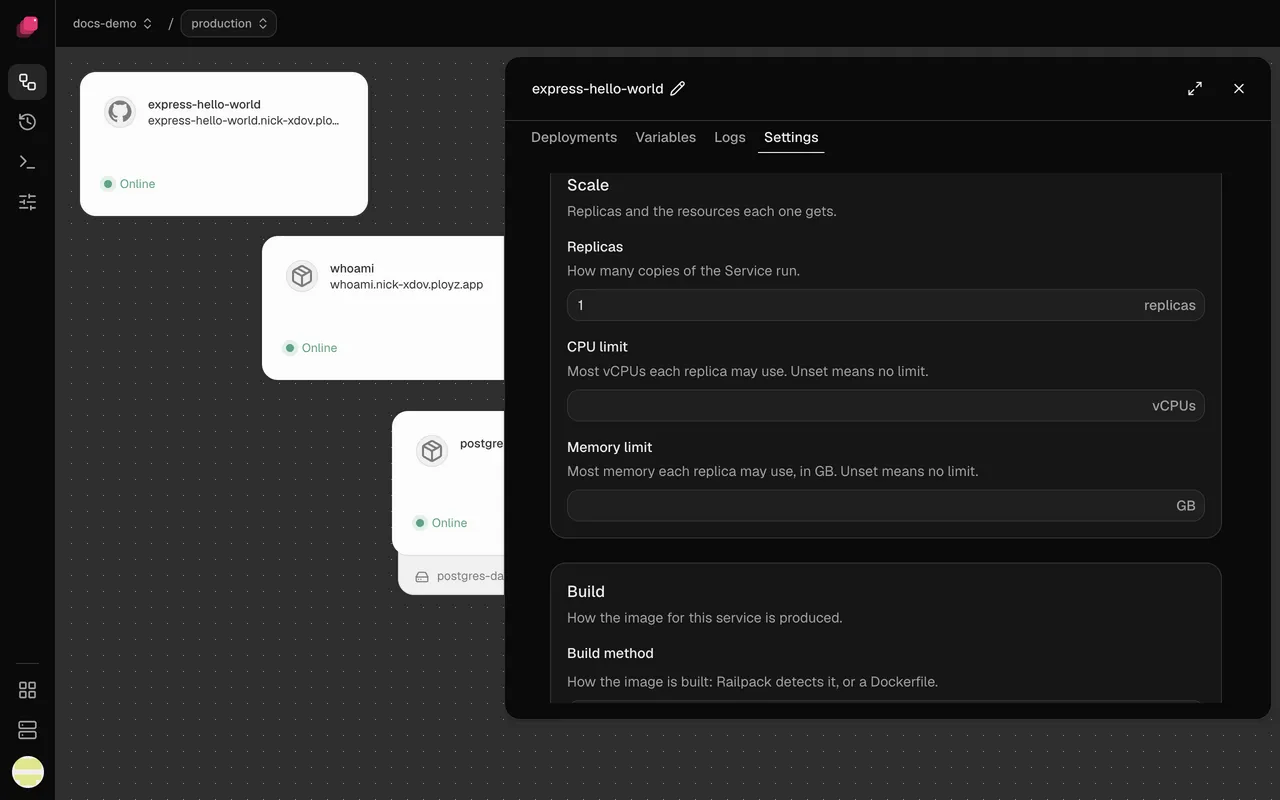
Ployz gives each server one replica before any server gets a second. A replica that crashes or fails its health check gets no traffic until it recovers.
CPU limit and Memory limit in the same section cap what each replica can use. Ployz doesn't check that a server has room for them, so leave some headroom.
Add a server
Section titled “Add a server”-
Add a server. It joins your other servers and takes web traffic, like the rest.
-
Deploy again to spread your replicas onto it. Replicas only move when you deploy, and the dashboard's Deploy needs a staged change, so for now this takes the CLI:
ployz deploy
To see what runs where, open a server on the Servers page. Running here lists its services.
Give servers different jobs
Section titled “Give servers different jobs”Every server runs builds, runs services and takes web traffic. Turn jobs off to split the work, for example a build server that keeps builds away from your app, or a database server the internet can't reach. Run builds here is on each server's page; the other two are CLI-only for now:
# A build server: no services, no web traffic
ployz server set builder-1 --accepts-services=false --accepts-ingress=false

# Databases and workers: no public traffic
ployz server set db-1 --accepts-ingress=false
For a build server, also turn off Run builds here on your other servers. Running replicas move on your next deploy. Keep services on for a server that holds a volume: the services that use it can only run there.
When a server goes down
Section titled “When a server goes down”The Servers page shows the server Offline. Replicas on your other servers keep serving, though some requests are slower for a while, and for up to an hour some visitors may still be sent to the offline server. Services that ran only there are down.
To bring services back:
-
Deploy the services that don't use a volume on the offline server. They start on your other servers:
ployz deploy web workerUse the CLI and name them: a deploy that includes a service whose volume is on the offline server fails before it changes anything, and the dashboard's Deploy includes every service.
-
When the server comes back, its replicas start again. Your next deploy tidies up the extras.
-
If it's gone for good, remove it with
ployz server rm web-2 --no-reset --confirm web-2(Ployz can't reach it to reset it), then restore its databases from your backups.
Good to know
Section titled “Good to know”- A service with a volume runs one replica, on the server that holds the volume. See Volumes.
- Nothing scales on its own. There's no autoscaling: you choose the number of replicas.
- Preview environments run one replica of each service, whatever you set here.
- Update your own A records. If your custom domain's root points at your servers with A records, change them when you add or lose a server that takes web traffic. Generated addresses and CNAME records follow along on their own. See Domains.