
Configs
A config is a folder of text files that Ployz mounts read-only into your services. Use one for an app's settings, a web server's configuration, or a startup script, without rebuilding its image. Several services can share the same config.
Create a config
Section titled “Create a config”- Open your environment and choose Create → Config.
- Enter a Name, such as
app-settings, and click Create config. - In Files, click Add file, enter a File name, such as
app.conf, and click Add. - Write the file's text and click Save.
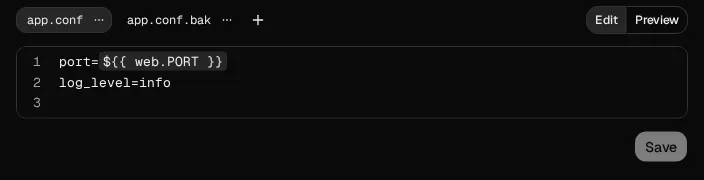
Save stages your file changes. Your running services keep their current files until you deploy. Save writes every edited file together. Each file's options menu shows its size and permissions; each file holds up to 256 KB. Unsaved edits stay visible if a save fails.
File names can include folders, such as conf.d/site.conf, with up to four path segments.
Use relative paths without ...
Mount it into a service
Section titled “Mount it into a service”- In the config's Mounts, click Mount on a service, then choose a Service.
- Enter an absolute Directory, such as
/etc/app, and click Mount. - Repeat for another service that needs the same files.
- Click Deploy in the bottom bar.
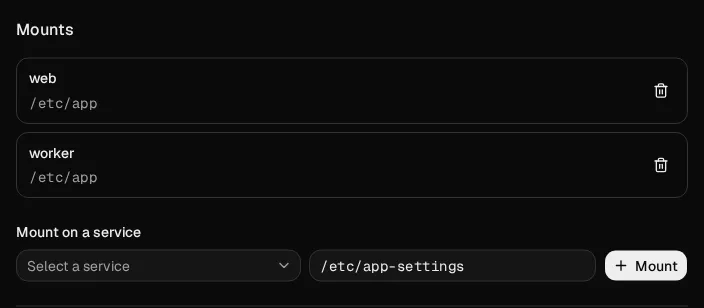
The service reads app.conf at /etc/app/app.conf. Each directory holds one config or volume,
so choose another directory if one is already mounted there.
The config's panel shows each mount's actual directory. Open the menu at the end of its row and choose Edit directory to move it, or Unmount to detach it on the next deploy. Unmounting keeps the config and its files. A refused mount keeps your entered directory so you can correct it and retry.
Reference a service's variable
Section titled “Reference a service's variable”In a file, write ${{ web.PORT }} to use web's PORT, or ${{ postgres.DATABASE_URL }}
for its database address. Type ${{ for suggestions. Include the service name, even when only
one service mounts the config.
Click Preview to check the text with its references filled in. Secret values stay masked.
The file your service receives contains the resolved values, so grant the app access only to
secrets it needs. Details shows your authored references, including ${{ web.PORT }},
without revealing the secret they reference.
Review or discard file changes
Section titled “Review or discard file changes”- Click Save after editing a file, then open Details in the bottom bar.
- Review the full Before and After text, with each file's mode, user ID, and group ID.
- To undo one file, open its actions menu and choose Discard. Choose Discard all of app-settings to undo the whole config.
- Click Deploy changes to apply the files, or Publish to save the staged configuration without changing running services.
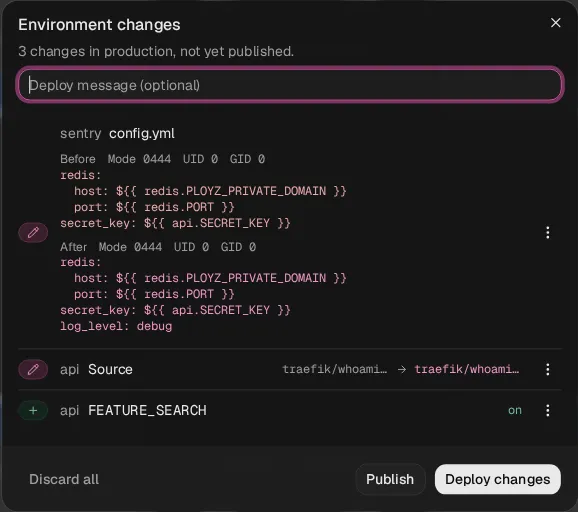
When a deployed config changes, Details names the services that restart on the next deploy. Services that do not mount it keep running. An unchanged redeploy keeps the existing replicas. A file is one change, so discarding it restores both its text and permissions.
Set file permissions
Section titled “Set file permissions”New files use mode 0444 and user and group ID 0. In a file's options menu, turn on
Executable to use 0555, then click Save. The mount stays read-only.
Custom modes and user and group IDs are CLI-only for now. For an app that reads files as user
1000, set the owner and permissions together:
ployz config put app-settings app.conf --from ./app.conf --mode 0440 --uid 1000 --gid 1000The dashboard shows custom permissions and preserves them when you edit the text.
Good to know
Section titled “Good to know”- Small text files. Each file holds up to 256 KB of UTF-8 text. Keep larger files in your image or a volume.
- Shared changes. Editing one config affects every service that mounts it. Create another config when a service needs different files.
- Remove or unmount. Remove file removes a file after deployment. Unmount keeps the config and its files. Delete config removes its mounts everywhere on the next deploy, and you can discard the change before deploying.
When you delete a config and create another with the same name before deploying, they remain
separate configs. To keep the deleted config, first rename or discard its replacement; keeping
both under one name would conflict. CLI discard accepts configs.@UUID to select one exact
config; a shared name is refused when it could select either config. A service mount can
likewise be selected with web.configs.@UUID; discarding it preserves another config's mounts,
even when the configs share a name.
Next, review your deployments.